I-visualize ang mga resulta
Mga bersyon ng package
Ang code sa pahinang ito ay ginawa gamit ang mga sumusunod na kinakailangan. Inirerekomenda naming gamitin ang mga bersyong ito o mas bago.
qiskit[all]~=2.5.2
Mag-plot ng histogram
Ang function na plot_histogram ay nagvi-visualize ng resulta ng pag-sample ng quantum circuit sa isang QPU.
Ang function na ito ay nagbabalik ng matplotlib.Figure na object. Kapag ang huling linya ng code cell ay naglabas ng mga object na ito, ipinapakita ng Jupyter notebooks ang mga ito sa ibaba ng cell. Kung tawagin mo ang mga function na ito sa ibang mga kapaligiran o sa mga script, kailangan mong tahasang ipakita o i-save ang mga output.
Dalawang opsyon ang mayroon:
- Tawagin ang
.show()sa ibinalik na object para buksan ang imahe sa bagong window (kung ang iyong naka-configure na matplotlib backend ay interactive). - Tawagin ang
.savefig("out.png")para i-save ang figure saout.pngsa kasalukuyang working directory. Angsavefig()na method ay tumatanggap ng path para ma-adjust mo ang lokasyon at filename kung saan mo sino-save ang output. Halimbawa,plot_state_city(psi).savefig("out.png").
Halimbawa, gumawa ng two-qubit Bell state:
# Added by doQumentation — installs the packages this notebook needs if they are missing
import importlib.util

_needed = {"matplotlib": "matplotlib", "numpy": "numpy", "qiskit": "qiskit"}
_missing = [pip for module, pip in _needed.items()
            if importlib.util.find_spec(module) is None]
# One at a time, so a package that fails to install does not block the others
for _pip in _missing:
    %pip install -q {_pip}
if not _missing:
    print("\u2713 All required packages are installed")
from qiskit.primitives import StatevectorSampler as Sampler
from qiskit.transpiler import generate_preset_pass_manager

from qiskit.circuit import QuantumCircuit
from qiskit.visualization import plot_histogram
# Quantum circuit to make a Bell state
bell = QuantumCircuit(2)
bell.h(0)
bell.cx(0, 1)
bell.measure_all()

pm = generate_preset_pass_manager(optimization_level=1)
isa_circuit = pm.run(bell)

# execute the quantum circuit
sampler = Sampler()
job = sampler.run([isa_circuit])
result = job.result()

print(result)
PrimitiveResult([SamplerPubResult(data=DataBin(meas=BitArray(<shape=(), num_shots=1024, num_bits=2>)), metadata={'shots': 1024, 'circuit_metadata': {}})], metadata={'version': 2})
plot_histogram(result[0].data.meas.get_counts())

Mga opsyon sa pag-plot ng histogram
Gamitin ang mga sumusunod na opsyon para sa plot_histogram para ma-adjust ang output graph.
-
legend: Nagbibigay ng label para sa mga execution. Tumatanggap ito ng listahan ng mga string na ginagamit para mag-label ng mga resulta ng bawat execution. Pinaka-kapaki-pakinabang ito kapag nagpo-plot ng maraming resulta ng execution sa iisang histogram -
sort: Inaayos ang pagkakasunod-sunod ng mga bar sa histogram. Maaari itong itakda sa pataas na pagkakasunod-sunod gamit angasco pababa gamit angdesc -
number_to_keep: Tumatanggap ng integer para sa bilang ng mga term na ipapakita. Ang natitirang mga ito ay pinagsama sa iisang bar na tinatawag na "rest" -
color: Inaayos ang kulay ng mga bar; tumatanggap ng string o listahan ng mga string para sa mga kulay na gagamitin para sa mga bar ng bawat execution -
bar_labels: Inaayos kung ang mga label ay nakalagay sa itaas ng mga bar -
figsize: Tumatanggap ng tuple ng sukat sa pulgada para sa output figure
# Execute two-qubit Bell state again

job = sampler.run([isa_circuit], shots=1000)
second_result = job.result()

# Plot results with custom options
plot_histogram(
    [
        result[0].data.meas.get_counts(),
        second_result[0].data.meas.get_counts(),
    ],
    legend=["first", "second"],
    sort="desc",
    figsize=(15, 12),
    color=["orange", "black"],
    bar_labels=False,
)

Pag-plot ng mga resulta ng Estimator
Walang built-in na function ang Qiskit para sa pag-plot ng mga resulta ng Estimator, ngunit maaari kang gumamit ng bar plot ng Matplotlib para sa mabilis na visualization.
Para ipakita, tinatantya ng sumusunod na cell ang mga expectation value ng pitong iba't ibang observable sa isang quantum state.
import numpy as np
from qiskit import QuantumCircuit
from qiskit.quantum_info import SparsePauliOp
from qiskit.primitives import StatevectorEstimator as Estimator
from qiskit.transpiler import generate_preset_pass_manager
from matplotlib import pyplot as plt

# Simple estimation experiment to create results
qc = QuantumCircuit(2)
qc.h(0)
qc.crx(1.5, 0, 1)

observables_labels = ["ZZ", "XX", "YZ", "ZY", "XY", "XZ", "ZX"]
observables = [SparsePauliOp(label) for label in observables_labels]

pm = generate_preset_pass_manager(optimization_level=1)
isa_circuit = pm.run(qc)
isa_observables = [
    operator.apply_layout(isa_circuit.layout) for operator in observables
]

# Reshape observable array for broadcasting
reshaped_ops = np.fromiter(isa_observables, dtype=object)
reshaped_ops = reshaped_ops.reshape((7, 1))

estimator = Estimator()
job = estimator.run([(isa_circuit, reshaped_ops)])
result = job.result()[0]
exp_val = job.result()[0].data.evs
print(result)

# Since the result array is structured as a 2D array where each element is a
# list containing a single value, you need to flatten the array.

# Plot using Matplotlib
plt.bar(observables_labels, exp_val.flatten())
PubResult(data=DataBin(evs=np.ndarray(<shape=(7, 1), dtype=float64>), stds=np.ndarray(<shape=(7, 1), dtype=float64>), shape=(7, 1)), metadata={'target_precision': 0.0, 'circuit_metadata': {}})
<BarContainer object of 7 artists>

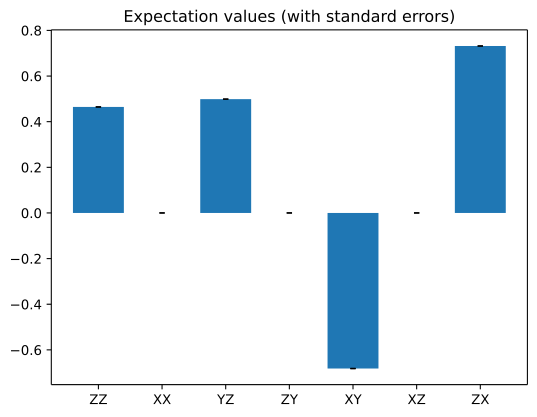
Ginagamit ng sumusunod na cell ang tinantiyang standard error ng bawat resulta at idinaragdag ang mga ito bilang mga error bar. Tingnan ang bar plot documentation para sa kumpletong paglalarawan ng plot.
standard_error = job.result()[0].data.stds

_, ax = plt.subplots()
ax.bar(
    observables_labels,
    exp_val.flatten(),
    yerr=standard_error.flatten(),
    capsize=2,
)
ax.set_title("Expectation values (with standard errors)")
Text(0.5, 1.0, 'Expectation values (with standard errors)')